
GoHighLevel CRM for
Cash-Pay Healthcare Practices
GoHighLevel for medical clinics puts every inquiry, call, text, email and DM in one place, with a clear pipeline from first contact to booked patient. We set it up, automate your follow-up and manage it for cash-pay and private clinics across the US.
Lead pipeline
New inquiry
Jordan M.
MetaPriya S.
GoogleContacted
Alex R.
WebsiteConsult booked
Sam T.
InstagramCasey L.
GoogleShowed
Taylor B.
MetaPatient
Morgan K.
WebsiteFollow-up sent
Automatically, 2 min after inquiry
Why leads get lost after they come in
A CRM for medical clinics fixes what happens after someone reaches out. Without one, most clinics run into the same five problems.
- Unread in 5 places
Leads are scattered everywhere.
Inquiries sit in email, voicemail, Instagram, Facebook, website forms and spreadsheets, and some never get seen.
- Status: ?
New lead
Botox inquiry
Nobody knows where each lead stands.
Was she called back? Did he book? Without one clear view, people fall through the gaps.
- Call her back??3 days ago
Follow-up depends on memory.
On busy days, callbacks and reminders are the first thing to slip.
Meta 20%
Google 15%
Unknown 65%
You don't know where patients come from.
Without tracking, you can't tell which ads, pages or posts actually bring in booked consults.
Scheduler
Texting app
Email tool
Review tool
6 subscriptionsYou pay for too many tools.
A separate scheduler, texting app, email tool and review tool, and none of them talk to each other.
How we set up GoHighLevel for your clinic, step by step
GoHighLevel for medical clinics, built in the order that gets your team using it fast, from setup to automation and reporting. Take the full setup, or choose only the services you need.
We review your current CRM if you have one, then set up your account: users and permissions, your phone number, your email sending domain and your business details, so everything is ready for your team from day one.
What you get
- CRM audit, if you have one
- Account, users and permissions
- Phone number and email domain setup
We import your contact lists and old leads from spreadsheets or your old tools, remove duplicates and tag everyone by source and service, so you can reach the right people later.
What you get
- Contact and lead import
- Duplicate clean-up
- Tags by source and service
We build a pipeline that matches your patient journey, like New inquiry, Contacted, Consult booked, Showed, Treatment booked and Patient. Leads move automatically as they reply, book or show up.
What you get
- Custom pipeline stages
- Automatic stage changes
- Lead source on every contact
We connect your phone, text messages, email, website chat, Instagram, Facebook and ad lead forms into one inbox, with missed call text back turned on. We register your texting number for A2P 10DLC so your messages get delivered.
What you get
- One inbox for every channel
- Website forms and ad lead forms connected
- A2P 10DLC texting registration
We set up booking calendars for your services and providers, with confirmations and reminders by text and email. Patients can confirm or reschedule in one tap, and missed appointments trigger a rebooking message.
What you get
- Service and provider calendars
- Confirmations and reminders
- No-show rebooking
New inquiries get an instant reply, then follow-up messages over the next days and weeks if they don't book. Different services get different messages, and follow-up stops as soon as someone books or asks to stop.
What you get
- Instant reply workflows
- Follow-up sequences by service
- Internal alerts for your team
After every visit, patients get a simple review request, sent to everyone, not only happy patients. We also run text and email campaigns to past patients and old inquiries, only to people who agreed to hear from you.
What you get
- Review request automation
- Past patient reactivation
- Email and text campaigns
We build dashboards that show leads, bookings and sources, so you can see which ads and channels bring booked consults. Your team gets short training sessions and how-to videos, and we're on hand for support every month.
What you get
- Lead source and booking dashboards
- Team training and how-to videos
- Monthly support and updates
Already using GoHighLevel but it's messy? Start with a CRM audit (step 01).
How your CRM goes live
Your core CRM can be running in 2 business days. Then we fine-tune it around your team.
Days 1–2
Core setup
Pipeline, inbox, forms, calendars and your first follow-up sequences, live and working.
Weeks 1–2
Move in and train
Your contacts imported, your team trained and old tools switched off.
Weeks 3–4
Fine-tune
We adjust follow-up timing, messages and booking rules based on real conversations.
Month 2 and on
Grow
Reactivation campaigns, review requests and more automation as your clinic grows.
Note: Texting registration (A2P 10DLC) can take a few days to be approved by US carriers. Everything else goes live first, with texting added as soon as it's approved.
What our experts handle every month
You don't have to manage the system. Our CRM team keeps it running and improving, and you see the progress in your dashboard whenever you like.
- Workflow and automation checks, so nothing breaks
- Pipeline cleanup and lead status checks
- New or updated follow-up sequences
- Calendar, booking and reminder updates
- Reactivation or review campaigns
- Texting registration and consent checks
- Support and training for your team
- Updates and progress posted in your dashboard
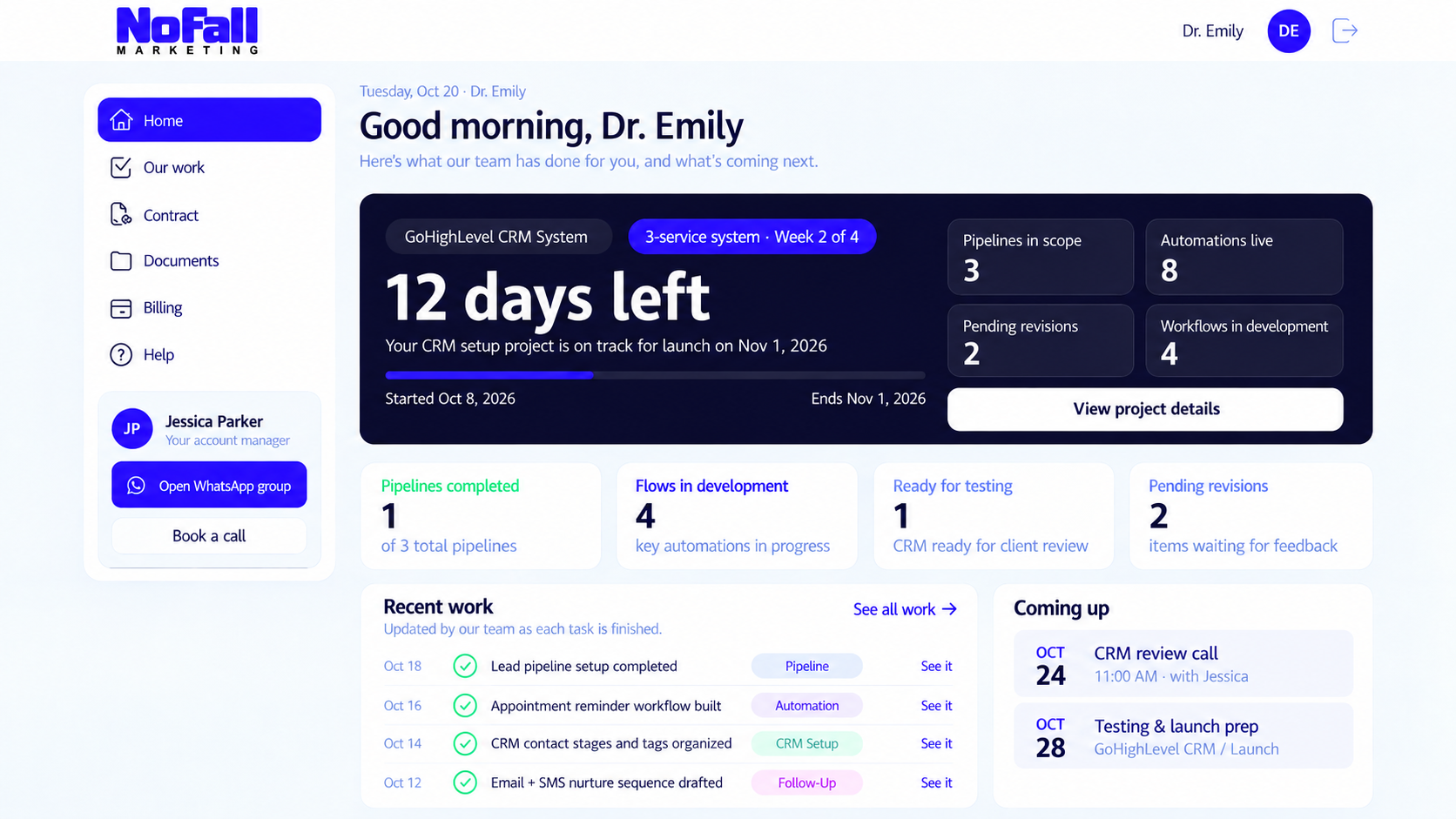
Illustrative example — sample clinic and numbers, not client results.
All you need to do is check your progress dashboard: every update we make and every task we finish, in one place.
FAQ
GoHighLevel CRM: common questions
Ready to stop losing leads after they come in? Talk to a healthcare CRM specialist.
A 30-minute strategy call for US clinics ready to organize their leads. We look at how inquiries reach you today, where they get lost and the system we'd build for you.