Google Ads for Cash-Pay
Healthcare Clinics
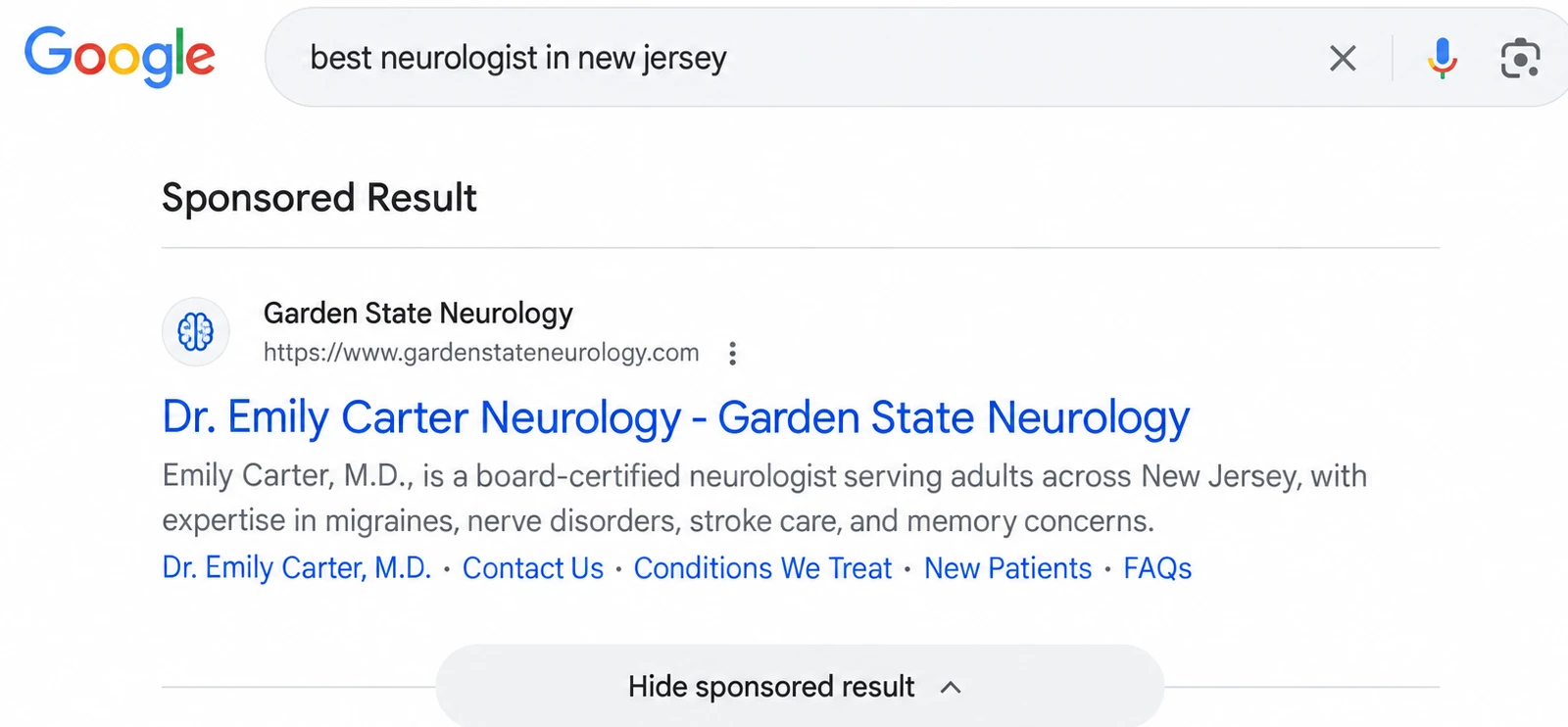
Google Ads put your clinic at the top of Google when people nearby are already searching for the service or treatment you offer. We run them for cash-pay and private clinics across the US, and make sure every call and form turns into a fast reply.
Call from ad
New patient · just now
Google Ads vs SEO vs Meta Ads: which is right for your clinic?
Google Ads are the fastest way to reach people already searching for your services. Here's how they compare to SEO and Meta ads.
| Best for Quick ResultsGoogle AdsHigh-Intent Patients | SEO Long-Term Growth | Meta Ads Build Awareness | |
|---|---|---|---|
| How patients find you | They search on Google and see your ad at the top | They search on Google, Maps or AI tools and find you for free | They see your ad on Facebook or Instagram while scrolling |
| Patient intent | Highest: they want it now | High: they're looking for your service | Lower at first: you reach them before they search |
| Speed to first results | Often within days | First signs in about 3 months | Usually within 1–2 weeks |
| How long results last | Stops when the budget stops | Keeps working for months and years | Stops when the budget stops |
| How you pay | Monthly fee + ad spend per click | Monthly fee, no cost per click | Monthly fee + ad spend per view or click |
| Best for | Fast calls for services people already search for | Steady, long-term patients at a lower cost over time | Elective and cash-pay services people choose with their eyes, plus building awareness |
| Main healthcare rules | Google's healthcare ad policy, limited remarketing | Accurate claims and real reviews | Meta's health ad rules, no condition targeting |
| Works best with | Focused landing pages and fast call answering | A strong website and Google profile | Good creative, video and fast follow-up |
Best for Quick Results
Google Ads
Reach patients who are actively searching for your services on Google. Put your clinic in front of people ready to book consultations, with targeted campaigns built to generate qualified inquiries.
You're on this page
Not sure? Ask the NoFall Team
Tell us what you're looking for and we'll point you to the right one.
Why your Google Ads aren’t booking patients
PPC for medical clinics works because people are already searching. But most clinics lose their budget in the same five places, and every one of them can be fixed.
Search terms
consultation near mefree consultationclinic jobscheap treatmentYou pay for the wrong searches.
Without careful keyword choices and negative keywords, your budget goes to people searching for free services, jobs or things you don't offer.
Sponsored
Limited by policy
Your ads get limited or disapproved.
Google has a strict healthcare ad policy. Some services and words need extra care, or your ads may not show at all.
Ad
Homepage
Every click lands on your homepage.
People searching for one specific service land on a general page, can't find what they need and leave.
Missed call: 6:42 PM
From your Google ad · went to voicemail
Calls go unanswered.
Many search ads bring phone calls. If they hit voicemail after hours, that click is wasted.
Clicks
1,240
Sample reportBooked
?
You don't know which keywords bring patients.
Most accounts only track clicks or form fills, not which searches actually turned into booked consults.
How we run your Google Ads management, step by step
Every part of your Google Ads, in the order a strong account is built, from a clean setup to the call that turns into a booked consult. Take all eight steps as full management, or choose only the services you need.
We audit your current account if you have one, or set up a new one that you own. We connect your Google Business Profile and Google Analytics, set up billing and team access, and apply for any Google approvals your services need under Google's healthcare policy.
What you get
- Google Ads account audit report
- Account setup in your name
- Google Business Profile and Analytics linked
- Help with Google healthcare approvals, if needed
We find the high-intent searches people use when they're ready to book, like your services plus "near me" or your city. Each service gets its own campaign plan, with a monthly budget recommendation based on real costs in your area.
What you get
- High-intent keyword list for each service
- Campaign plan
- Monthly budget recommendation
From day one we block searches for free services, jobs, training, cheap deals and anything you don't offer. Every week we review the real searches that triggered your ads and add new negatives, which matters even more for a cash-pay clinic.
What you get
- Starting negative keyword list
- Weekly search term reviews
- Ongoing waste reduction
We build campaigns and ad groups for each service and write ads that say plainly what you offer and why to choose you. We add ad assets like call buttons, your location, sitelinks and short highlights, so your ad takes up more space and earns more calls.
What you get
- Search campaigns for each service
- Responsive search ads
- Call, location, sitelink and callout assets
People searching for one service should land on a page about that service, with a clear next step and an easy way to call or book. We build or improve these pages for speed and mobile, which also raises your ad quality and lowers what you pay per click.
What you get
- A landing page for each main service
- Click-to-call and booking buttons
- Speed and mobile checks
We track calls and form submissions, and connect your CRM so we can see which keywords led to booked consults, not just clicks. Google Ads and Analytics aren't built to hold patient health information, so no health details are ever sent to Google.
What you get
- Call and form conversion tracking
- CRM connection for booked consults
- Privacy-safe setup with no health data shared
We adjust bids, budgets, locations and ad schedules based on real results, test new ads and landing pages, and check every new keyword and ad against Google's healthcare policy so your account stays in good standing.
What you get
- Weekly bid and budget changes
- Ad and landing page tests
- Policy checks on every change
Every lead goes into your CRM, missed calls get an instant text back and our AI receptionist replies in seconds. Each month you get a plain-English report on spend, calls, inquiries and cost per inquiry, plus a strategy call.
What you get
- Missed call text back and instant replies
- Leads synced to your CRM
- Monthly report and strategy call
Already running Google Ads? Start with a one-time account audit (step 01), and we'll show you where your budget is leaking.
How your Google Ads ramp up
Search ads can bring calls quickly, because people are already looking. The first months are about cutting waste and finding what books patients.
Days 1–2
Set up and launch
Keywords, ads, landing pages, call and conversion tracking, and your CRM connected. Ads go live within 2 business days.
Weeks 1–4
Clean up
We review every search that triggered your ads, add negative keywords and move budget to what's working.
Months 2–3
Improve
Smarter bidding based on real conversions, landing page tests and a lower cost per inquiry.
Month 3 and on
Grow
Expand to more services and areas, and add new campaign types where they make sense.
Note: Results depend on your market, your services, your budget and how fast your team answers. We'll tell you what's realistic on your strategy call.
What our experts handle every month
You don't have to manage any of it. Our Google Ads team does the work, and you see the progress in your dashboard whenever you like.
- Weekly search term reviews and new negative keywords
- Bid and budget changes based on what's booking patients
- New ad tests
- Landing page tests and updates
- Call and conversion tracking checks
- A policy check on every new ad and keyword
- Every new lead sent straight to your CRM for a fast reply
- Campaign updates and progress posted in your dashboard
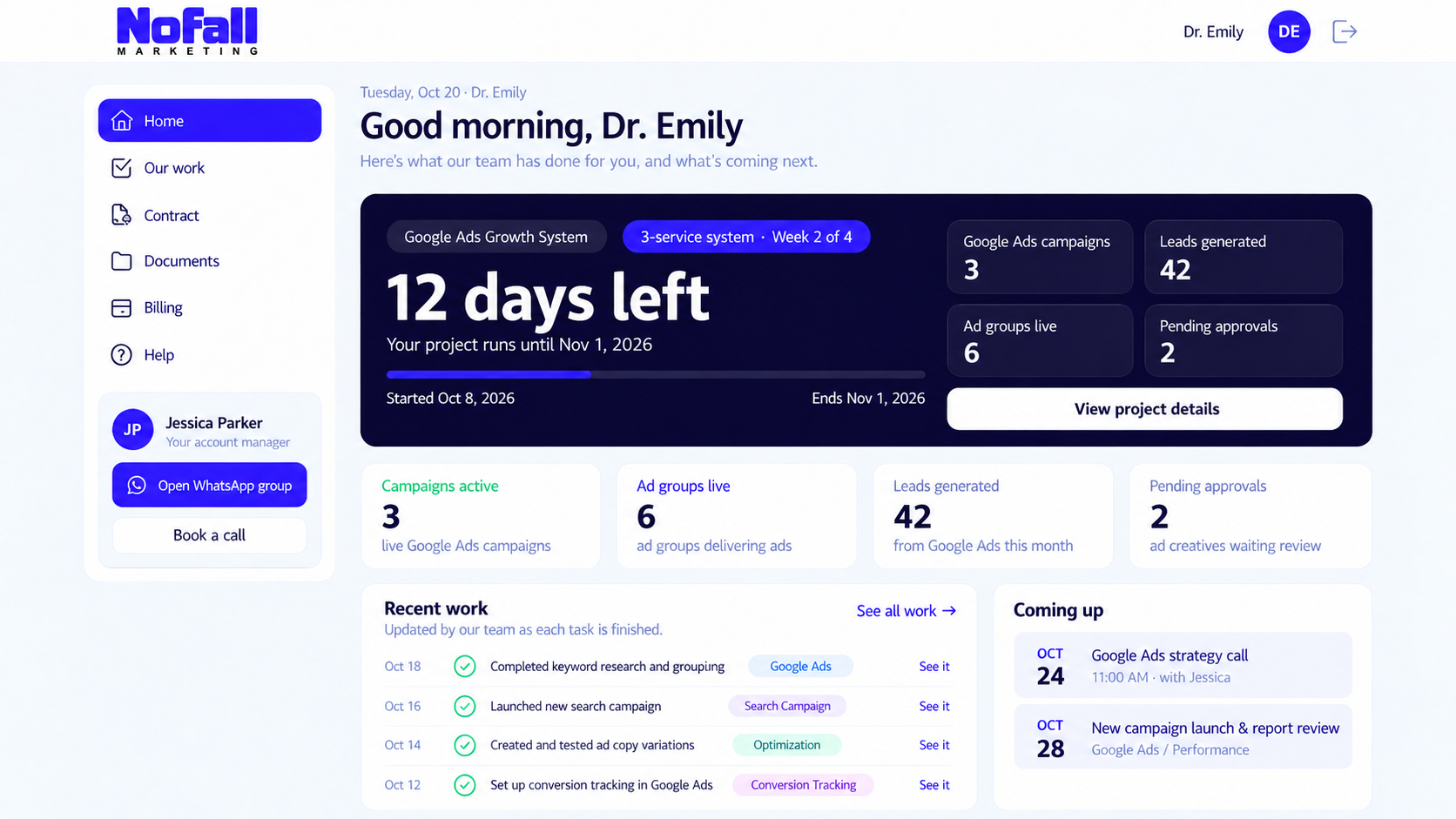
Illustrative example — sample clinic and numbers, not client results.
All you need to do is check your progress dashboard: every task we finish, every test we run and every campaign update, in one place.
FAQ
Google Ads for healthcare: common questions
Ready to show up when patients search? Talk to a Google Ads specialist.
A 30-minute strategy call for US clinics ready to invest in ads. We look at your current account or market, the searches worth paying for, and the plan we'd run.